
FeedValidate.com - How do we run our tests and how to improve your score?
In the landscape of product ads, taking proper care of your data is a must. This is the main reason behind the creation of our feed validator. In this article we will share some insights into our logic and process of scoring your product data feeds, and how to improve on this metric.

Trusted by:


What’s the logic behind our scoring system?
As you are probably aware, Google has several segments of product data requirements. Some of the parameters that are included in the product files are mandatory, some are optional. Obviously if one of your products doesn’t fulfill the requirements of all the mandatory parameters, it won’t be shown in any of the campaigns that are run through the Google ecosystem.
But fulfilling the “mandatory” requirements is just the tip of the iceberg when it comes to running successful campaigns with Google. Our rapport after each validation will show you the score - a number somewhere between 0-100 points. When in green, you can be sure that the results of your product ads are not compromised by the quality of the product data itself. When in yellow, there are probably some easy wins for you to improve the performance of your marketing efforts. Last but not least, when your score lands in “red”, there is definitely some critical work to be done with your product data.
How is ”the score” calculated?
Each of the products within your product data file can score one of 3 options:
1 point - success, all is good,
0.5 points - product has received 1 “warring” score on a parameter,
0 points - there was an error result on one of the tests
The overall score is calculated as a percentage number - if all of your products scored full points, you will get a splendid 100% score.
If 10% of tests have resulted in an error, you will get a 90% score, but with multiple products that scored red flags on our report - that usually means that those products will not be visible in your campaigns, therefore they definitely need your attention.
You can also get the same 90% score on actually completely different scenario: 20% of all the products from the file have scored 0.5 points and the rest of the products went through tests brilliantly, scoring all the points possible.
What tests are run within feedvalidate?
Every single product you pass with your product data feed is being tested by our validator. Every single parameter is being checked in terms of format compliance.
The number of tests depends on several two main factors:
- what products category you have picked (there are different requirements for electronics as well as for apparel products);
- in what country do you intend to use the validated feed (each country has some specific regulatory requirements on what data must be passed, as well as in what format it should be shown);
How to improve your feedvalidate.com score?
The short answer is: it depends. But basically, if you take care of your data quality, your score will be high :)
Let’s take a look at some examples.
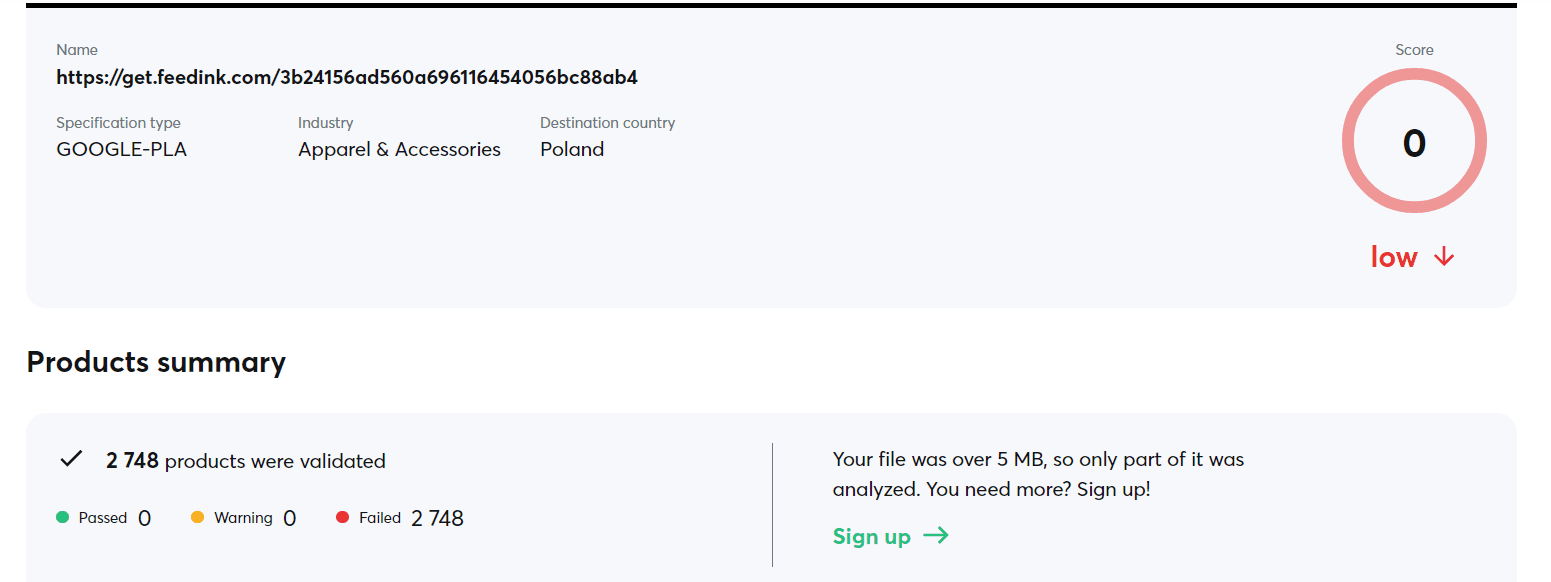
Here is the result of a test that returned a really alarming score. 0% - literally can’t get any worse.
If you dive a little bit deeper into what happened during the validation process you will quickly find out this alarming result came in despite the fact that most of the test has ended with success.

Just a little over 144k tests for 2.7k products.
Only 18% of the test resulted in an error, but despite that, we scored atrocious 0/100 points.
Scrolling down the report we can find out what went wrong:

First critical error: our product file didn’t contain “mpn” - that is the manufacturer product number.
Further below there is another critical error in the report:

It also seems that our file had some wrong format when passing the parameter defined by Google as “g: gender”. That parameter should be stated as “male”, “female” or “unisex”. Any other value will be ignored by the algorithm that is checking our file.
Both MPN and gender are mandatory values that have to be defined and passed whenever you want to run apparel marketing campaigns with Google. If you are missing any of those mandatory requirements, your product ads simply won’t go.
Fixing those two errors for each of the 2748 products should be enough for your campaigns to be up and running. But we strongly recommend diving deeper into the report:
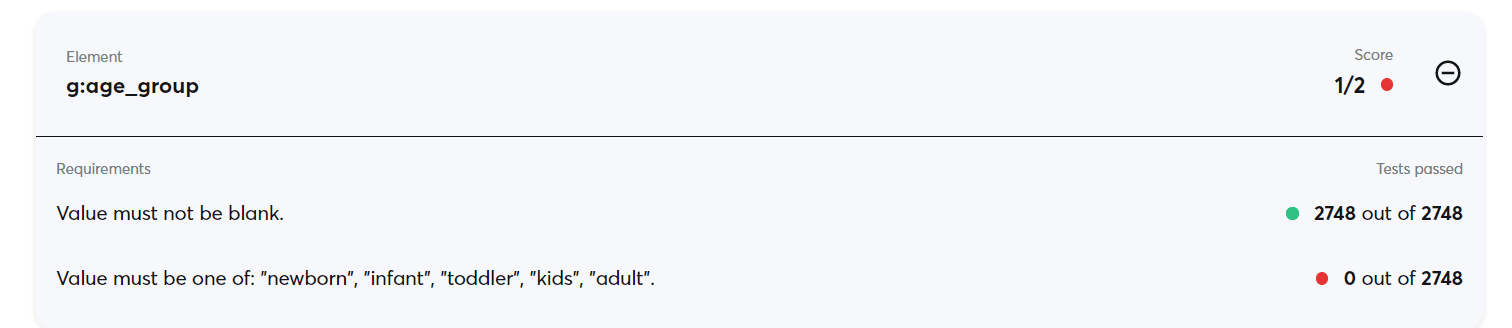
Among many optional parameters that you pass with product data is “g:age_group”. Age group is a parameter that is particularly helpful for Google ads targeting algorithms to optimize your campaigns. If the apparel products from your file have only products that have been sized to fit a teen or older clients, you can just change the value in all your products to [adult].
Summary
Usually changing the structure of the product data files can be a pain. Sometimes it is simply impossible to do so without engaging the IT resources of your organization. In those cases we recommend using our system at feedink.com - it is a simple yet powerful tool that will help keep your product data under control :)
What is Feedink?
Feedink is a product feed management tool. It imports your store's offer, lets you improve it with rules and sends up-to-date feeds to Google Shopping, Meta, price comparison sites and marketplaces.
Would you like to learn more about how we can help your business?


